SEO GUIDE
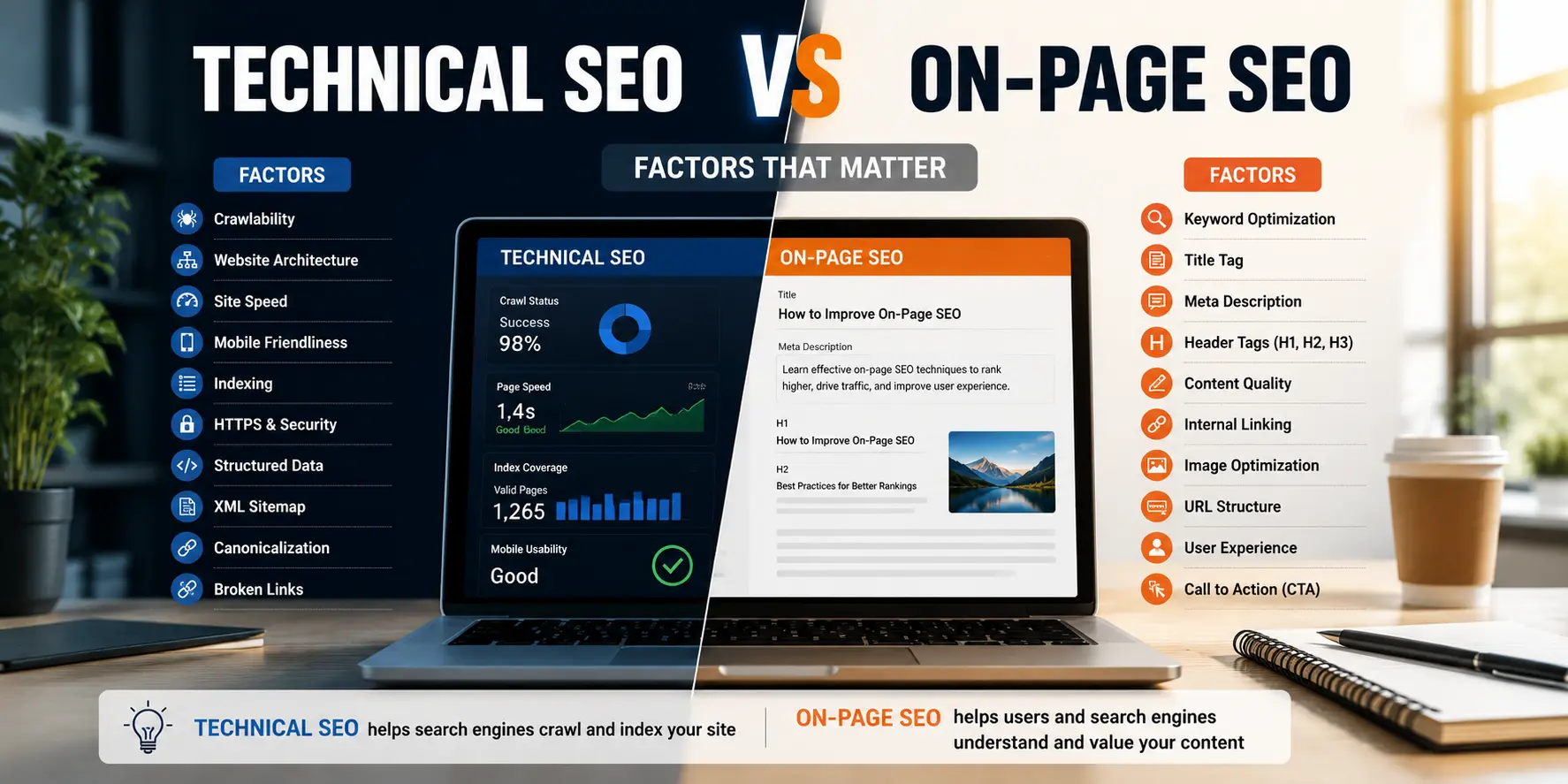
Someone asked me last week why their blog wasn't ranking despite "doing everything right." Good content, decent length, keyword sitting right there in the title. Turned out half their posts weren't even indexed. That's the trap with this whole technical SEO vs on-page SEO debate. People treat it as one thing when it's really two very different jobs, solved by two very different people.
Here's the short version before we go deep. Technical SEO decides whether Google can find, load, and trust your pages at all. On-page SEO decides whether those pages actually deserve to rank once Google can see them clearly. One is the foundation you can't skip. The other is what you build on top of it once the foundation holds. Mix the two up, and you end up fixing the wrong problem for months while rankings sit still.
This guide walks through both properly, with real ranking factors, checklists you can use today, mistakes we run into on client sites almost every month, and tools that don't need a huge retainer to run. Whether you're managing a WordPress blog, a Shopify store, or a 500-page product catalog, by the end you'll know exactly which layer is holding you back.
In this guide
- What Is Technical SEO?
- What Is On-Page SEO?
- Technical SEO vs On-Page SEO: The Core Difference
- Key Differences Table
- Technical SEO Ranking Factors
- On-Page SEO Ranking Factors
- How Technical SEO and On-Page SEO Work Together
- Technical SEO Audit Checklist
- On-Page SEO Checklist
- Common Technical SEO Mistakes
- Common On-Page SEO Mistakes
- Best Technical SEO Tools
- Best On-Page SEO Tools
- Technical SEO for WordPress
- Technical SEO for eCommerce Websites
- Expert Tips: Which SEO Should You Do First?
- Frequently Asked Questions
What Is Technical SEO?
Technical SEO is the practice of making sure search engines can crawl, render, index, and understand your website without tripping over anything. It has almost nothing to do with the words on the page. It's entirely about how that page gets delivered in the first place.
Think of it like the plumbing and wiring inside a house. Nobody compliments good plumbing, but everyone notices the second a tap stops working. A site can have genuinely brilliant content sitting behind a slow server, a broken sitemap, or a robots.txt file quietly blocking the entire blog folder, and none of that content ever gets a fair shot at ranking.
Definition: technical SEO covers crawlability, indexability, site speed, mobile usability, secure connections (HTTPS), structured data, and clean site architecture.
Why it matters: Google's crawlers, and increasingly AI crawlers like GPTBot, need a fast, clean path through your site. Hit errors, timeouts, or confusing redirect chains, and they simply crawl less of you. Trust erodes too, gradually, over repeated visits.
Real Example
A travel client had tour package pages rendered almost entirely through client-side JavaScript. Googlebot indexed the URLs fine, but rendered barely any visible text underneath. Every page looked thin, even though the copy sitting there was genuinely solid. That's a technical problem wearing a content costume. Once we moved to server-side rendering, rankings recovered within two crawl cycles, without a single word of copy changing.
Signs You Have a Technical SEO Problem
- Pages sit in your sitemap but never make it into the index
- Core Web Vitals fail on mobile for your important templates
- URL Inspection shows Google isn't rendering the full page
- Duplicate URLs floating around (with and without a trailing slash, http and https both live)
- Crawl Stats show budget wasted on parameter URLs nobody needs indexed
What Is On-Page SEO?
On-page SEO is everything you control directly on a page to make it the best possible answer for a specific search. The words, the structure, the headings, the images, and honestly, how well the whole thing matches what the person searching actually wanted when they typed the query.
Technical SEO asks "can Google read this." On-page SEO asks a completely different question: should Google rank this above the ten other results already sitting there. Content depth and relevance answer that one, not server configuration.
Definition: on-page SEO includes title tags, meta descriptions, header structure, keyword placement, content quality, internal linking, and image optimization, all handled on the page itself.
Why it matters: a page can be perfectly crawlable and load in under a second, and still lose to "best CRM for small teams" if it doesn't actually answer that better than what's already ranking. Speed alone doesn't win intent, it just clears the entry fee.
Real Example
We worked with a jewelry retailer once whose collection pages were technically spotless. Fast, indexed, mobile-friendly, nothing to complain about there. It still ranked below competitors with objectively worse site speed. The gap turned out to be on-page: thin category descriptions, no sizing or material guidance anywhere, headings repeating the same keyword four times instead of covering the questions a buyer would actually have. We rewrote the on-page content, touched zero code, and moved several pages from position 14 to position 6 within about six weeks.
Signs You Have an On-Page SEO Problem
- Pages are indexed, fast, technically clean, but stuck on page two
- Competitors with a weaker backlink profile still outrank you
- High bounce rate, low time on page from organic visitors
- Content answers the literal keyword but not the real question behind it
- Every title tag and heading follows the same repetitive template
Technical SEO vs On-Page SEO: The Core Difference
Here's a test we use with new clients before touching anything. Imagine copying your page's content, word for word, onto a brand-new, perfectly configured website. Does the task you're arguing about still matter on that new site?
If it still matters, keyword placement, heading structure, content depth, internal links, that's on-page SEO. If the task basically disappears because the new site already handles it, crawl budget, canonical tags, sitemap generation, page speed, that's technical SEO.
Technical SEO operates at the site level, and usually sits with developers or a technical specialist. On-page SEO operates at the page level, and usually sits with content teams or SEO writers. On a small team, though, one person often wears both hats, which is exactly why this comparison confuses so many people.
There's a dependency worth understanding here. Technical SEO sets the ceiling on what's possible. On-page SEO determines how close a page actually climbs toward that ceiling. Off-page work, backlinks, digital PR, brand mentions, adds a third layer on top of both, and it rarely means much if the technical foundation underneath is cracked.
Key Differences Table
| Factor | Technical SEO | On-Page SEO |
|---|---|---|
| Core question | Can search engines crawl, render, index this? | Is this page the best answer to the query? |
| Scope | Site-wide infrastructure | Individual page content |
| Typical owner | Developer, technical SEO specialist | Content writer, SEO strategist |
| Main levers | Speed, crawlability, indexation, HTTPS, schema | Titles, headings, keywords, content depth, links |
| When it breaks | Silently, across the whole site at once | One query at a time |
| Sets the ranking ceiling? | Yes | No, climbs toward it |
| Common tools | Search Console, Screaming Frog, PageSpeed Insights | Search Console Performance, Semrush, Surfer |
| Audit frequency | Quarterly, or after major site changes | Ongoing, per page |
Technical SEO Ranking Factors
Not every technical element carries equal weight. These are ordered roughly by how often each one actually caps a site's performance in real audits.
Crawlability and indexation. If Googlebot can't reach a page, or a stray noindex tag is quietly hiding it, nothing else on this list matters. Check the Pages report in Search Console for the gap between submitted and indexed.
Page speed and Core Web Vitals. Largest Contentful Paint, Interaction to Next Paint, and Cumulative Layout Shift, measured directly, with mobile usually weighted more heavily than desktop.
Mobile usability. Google indexes mobile-first now, meaning it primarily evaluates the mobile version of your site. A desktop-only fix does nothing if the mobile layout is actually broken.
Secure connection (HTTPS). Close to table stakes at this point, though sites migrating off old platforms still trip over mixed-content warnings surprisingly often.
Site architecture and internal linking depth. Pages buried five or six clicks from the homepage get crawled less often and pass along less link equity.
Structured data. Doesn't push rankings directly in most cases, but it opens the door to rich results and FAQ snippets, which do improve click-through rate.
Canonical tags. Without clear canonicals, ranking signals split across near-identical URLs, weakening every one of them at once.
XML sitemap accuracy. A sitemap full of 404s or redirected URLs just wastes crawl budget on pages that don't need it.
On-Page SEO Ranking Factors
Search intent match matters most here, by a wide margin. A perfectly optimized page targeting the wrong intent, say a product page for a query that really wants a comparison guide, simply won't rank, no matter how clean the code underneath it is.
After intent comes content depth and originality, not longer for the sake of longer, but genuinely more useful than whatever's already sitting on page one. Then title tags: 55 to 60 characters, primary keyword near the front, and it should actually describe what the page delivers rather than just cramming the phrase in.
Header structure matters too. One H1 per page, logical H2s that break the topic into scannable sections, H3s for sub-points. This helps AI Overviews and featured snippets pull answers out cleanly, which matters more with each passing month. Keyword and entity usage should feel natural throughout, related terms and named tools woven in, never stuffed for the algorithm's benefit.
Internal linking and image optimization round it out. Linking to and from relevant pages spreads authority and gives search engines context about what your site actually covers. Images need descriptive file names, compressed sizes, and alt text describing what's in the image rather than repeating the keyword one more time. Meta descriptions aren't a direct ranking factor, but they drive click-through, and that compounds over months.
How Technical SEO and On-Page SEO Work Together
Neither discipline works in isolation, and treating them as competing priorities is one of the more expensive mistakes a business can make. We see it happen often, usually because one department owns one side and nobody's actually talking to the other.
A page can be technically flawless and still rank poorly because the content doesn't match what people are searching for. Equally, a page can carry deeply researched, genuinely excellent content and never rank at all because it's stuck behind a rendering issue nobody caught in time.
Structured data is a good example of where the two disciplines physically overlap. It's implemented technically, usually as JSON-LD in the code, but it exists to communicate on-page meaning: FAQs, reviews, prices, authorship. Get the code wrong and Google simply ignores it. Get the content wrong and the schema becomes misleading, which in serious cases can trigger a manual action.
Internal linking sits in a similar spot. It's technical in the sense that it shapes crawl paths and site architecture, but on-page in the sense that anchor text and contextual relevance matter for rankings too. Fix one side without the other, and you rarely get the full result you were hoping for.
The sequencing that works in practice: confirm the technical baseline is clean first, indexation, rendering, speed, mobile usability. Once that's solid, shift most of the effort into on-page depth and intent matching. Off-page work only starts converting efficiently after that, because now you're pointing authority at pages that are both crawlable and genuinely competitive.
Technical SEO Audit Checklist
Run this quarterly, or right after any migration, redesign, or CMS change. Not a once-a-year exercise.
- Compare submitted vs indexed pages in Search Console
- Run Core Web Vitals for mobile and desktop, separately
- Crawl the site with Screaming Frog for 404s, redirect chains, orphan pages
- Check robots.txt for accidental disallow rules
- Confirm canonical tags point to the correct URL, everywhere
- Validate structured data with Google's Rich Results Test
- Test mobile rendering through URL Inspection
- Check for HTTPS mixed-content warnings
- Review the sitemap for stale or non-200 URLs
- Audit internal link depth, flag anything past 4 clicks from home
- Check for duplicate content across parameters, tags, or filtered views
On-Page SEO Checklist
- Title tag, 55 to 60 characters, keyword near the front
- Meta description, 150 to 160 characters, gives a real reason to click
- One H1, matches the primary keyword and intent
- Logical H2/H3 structure that stays scannable
- Primary keyword appears in the first 100 words
- Related keywords woven in naturally, never stuffed
- 3 to 5 relevant internal links on longer pages
- Alt text on every image, file sizes compressed
- Content actually answers the question, not just the keyword
- URL short, readable, includes the primary keyword
Common Technical SEO Mistakes
Sites lose rankings to these more often than people expect, and usually nobody notices until traffic has already dropped and someone starts asking why.
Blocking important pages in robots.txt during a migration, then forgetting to remove the rule after launch, happens more than you'd think. Leaving a staging site indexable is another one, and it creates a duplicate content problem fighting the live site for the exact same rankings.
Ignoring Core Web Vitals on the templates that actually matter, product pages, blog posts, while polishing a homepage that gets a fraction of the traffic anyway, is a common misallocation of effort. Redirect chains, where URL A goes to B goes to C, bleed a bit of link equity at each hop and slow the crawl down further than most people realize.
Client-side rendering without a fallback leaves crawlers staring at an empty shell instead of your actual content. And broken or missing canonical tags, especially common on eCommerce sites with filtered and sorted category views, is something we catch constantly during audits.
Common On-Page SEO Mistakes
- Keyword stuffing in headings, the same phrase repeated across every H2 instead of covering related sub-topics
- Writing for the keyword instead of the intent, publishing a blog post when the searcher actually wanted a comparison table
- Thin category or collection pages, one generic paragraph doing all the work
- Duplicate meta descriptions across dozens of pages, usually from a template nobody customized
- New content published with zero internal links pointing to it, orphaned from day one
- Exact-match anchor text on every single internal link, which can start looking manipulative to search engines
Best Technical SEO Tools
| Tool | Best For | Free or Paid |
|---|---|---|
| Google Search Console | Indexation, crawl stats, Core Web Vitals | Free |
| Google PageSpeed Insights | Diagnosing speed and Core Web Vitals | Free |
| Screaming Frog SEO Spider | Full crawl, broken links, redirect chains | Free to 500 URLs, paid beyond |
| Google Rich Results Test | Structured data validation | Free |
| Ahrefs Site Audit | Technical health scoring at scale | Paid |
| Semrush Site Audit | Crawl errors, Core Web Vitals, HTTPS | Paid |
| GTmetrix | Detailed speed waterfall analysis | Free tier available |
Best On-Page SEO Tools
| Tool | Best For | Free or Paid |
|---|---|---|
| Search Console (Performance) | Query-level ranking and click data | Free |
| Semrush | Keyword research, content gap analysis | Paid |
| Ahrefs | Keyword difficulty, SERP analysis | Paid |
| Surfer SEO | Optimizing content against top-ranking pages | Paid |
| Yoast SEO / Rank Math | On-page checklist enforcement inside WordPress | Free with paid tiers |
| AnswerThePublic | Question-based content ideas | Free tier available |
Technical SEO for WordPress
WordPress runs a huge share of small business sites and blogs, and it comes with its own recurring headaches, mostly plugin bloat and theme choices rather than the platform itself.
Install a caching plugin, WP Rocket or W3 Total Cache, to bring server response time down. Compress images automatically through something like ShortPixel, since uncompressed uploads are one of the biggest speed killers on WordPress sites and one of the easiest fixes available. Keep active plugins to a minimum too, since each one adds render-blocking scripts unless it's carefully managed.
Set a clean permalink structure early, under Settings then Permalinks, because changing it later without proper 301 redirects breaks every backlink pointing at the old URLs. Use Yoast SEO or Rank Math to auto-generate a clean sitemap and manage canonical tags. Check that your theme actually supports proper heading hierarchy instead of styling paragraphs to look like headings, which confuses crawlers more than most site owners realize.
One thing worth flagging directly: WordPress sites tend to accumulate "SEO plugins on top of SEO plugins" over the years. Two plugins fighting to control the same sitemap, or both trying to output schema at once, is a common, self-inflicted technical problem worth checking for during any audit.
Technical SEO for eCommerce Websites
eCommerce sites face a different set of technical challenges, largely down to scale and dynamic URLs generating pages faster than anyone can manually review them.
Faceted navigation is the big one. Filters like size, color, and price can generate thousands of near-duplicate URLs, and canonical tags or robots directives are what keep these from bloating the crawl budget. Out-of-stock handling matters too. Decide in advance whether to noindex, redirect, or keep the page live with clear messaging, because leaving it as a broken dead end hurts both users and crawlability.
Pagination on category pages needs to stay crawlable, not accidentally blocked, since page 2 and page 3 of a category often hold genuine long-tail potential. Product schema, price, availability, and reviews, directly influences whether your listings earn rich snippets, and that meaningfully affects click-through rate. Site speed under load matters more here too, product image galleries and third-party review widgets are common bottlenecks specific to eCommerce templates.
Expert Tips: Which SEO Should You Do First?
Run this quick diagnostic before spending money on either side.
Step one: check technical health. Open Search Console. Is there a big gap between submitted and indexed pages? Are Core Web Vitals failing on your key templates? If yes, fix technical first, full stop. It caps everything above it, and content work won't overcome a rendering or indexation problem no matter how good that content is.
Step two: if technical is clean, look at the on-page. Pull your target keywords and compare your page against whatever's sitting in positions one through three. Is your content actually deeper and more useful, or just present on the page? Most established, well-built sites have already handled their technical issues, which is exactly why on-page and content work tends to be the bigger, cheaper win at that stage.
Step three: if both are clean and rankings still aren't moving, the bottleneck has probably shifted off-site entirely, into authority and backlinks. That's a different conversation, but it only makes sense to have it once the first two layers are actually solid.
One more practical note. Don't run a full technical audit every single month on a site that's already technically healthy, that's a common waste of budget agencies sometimes push. Quarterly, or right after a redesign or migration, is enough. Spend the rest of the time on-page, where most established sites still have real room to grow.
Conclusion
Framing this as "technical SEO vs on-page SEO" makes it sound like a competition, but it really isn't one. Technical SEO is the foundation: crawlability, speed, indexation, architecture. On-page SEO is what gets built on that foundation: content depth, keyword relevance, matching what someone actually wanted when they typed the query.
The practical takeaway is simple. Diagnose before you spend anything. Check Search Console for indexation gaps and Core Web Vitals failures first. If those come back clean, and on most modern, well-maintained sites they usually do, shift effort toward on-page depth and intent matching, since that's where the bigger, cheaper wins tend to sit today.
Neither discipline replaces the other. A technically perfect site with thin content won't outrank a competitor who genuinely answers the query better. A brilliantly written page trapped behind a rendering or indexation issue won't get a fair shot at ranking at all. Fix whichever layer is currently capping your results, keep auditing both on a regular schedule as the site grows, and the rankings tend to follow.
Frequently Asked Questions
What are the main differences between technical SEO and on-page SEO?
Technical SEO covers site infrastructure, crawlability, speed, and indexation, working at the site-wide level. On-page SEO covers content, keywords, and structure on individual pages. One decides whether Google can access your site. The other decides whether it deserves to rank once it can.
How do technical SEO and on-page SEO strategies complement each other?
Technical SEO sets the ceiling by making sure pages get crawled, rendered, and indexed correctly. On-page SEO determines how close each page actually climbs toward that ceiling through intent matching and genuine content depth.
What's the difference between technical SEO and on-page SEO in one sentence?
Technical SEO asks whether search engines can read your site at all, while on-page SEO asks whether this specific page is the best answer available right now.
Is technical SEO part of on-page SEO?
No, they're distinct disciplines, though they overlap in places like structured data and internal linking. Technical SEO typically sits with developers, while on-page SEO typically sits with content teams.
Which is better, technical SEO or on-page SEO?
Neither is inherently better, since both are necessary. Technical SEO matters more when it's broken, because it blocks everything else downstream. On-page SEO matters more once the technical foundation is solid, which describes most modern, well-built sites already.
Can a website rank without technical SEO?
Not reliably. Severe technical issues, blocked crawling, a rendering failure, often mean the content never gets evaluated fairly at all, regardless of how good it actually is.
Why is on-page SEO important?
It's how a page proves it deserves to rank above competitors for a specific query. Search engines increasingly reward genuine intent match and real content depth over keyword presence alone.
Why is technical SEO important?
It clears the barriers that stop search engines from crawling, rendering, and indexing content properly. Skip it, and even outstanding writing might never get a fair evaluation.
Does technical SEO affect rankings?
Yes, both directly through page speed and Core Web Vitals, and indirectly by determining whether pages get indexed and rendered correctly in the first place.
Does on-page SEO improve traffic?
Yes. Better intent matching, stronger titles, and deeper content typically improve rankings and click-through rate together, which drives more organic traffic over time.
Which SEO should I do first?
Run a technical audit first to rule out anything blocking the site. If that comes back clean, shift budget and time toward on-page and content work, since that's usually where the bigger gains sit on an established site.
How often should I run a technical SEO audit?
Quarterly for most sites, or immediately after a redesign, CMS migration, or any significant change to site structure or hosting.